UPS Logbooks
Template and Their parameters.
1- What a UPS logbook records
UPS logbook is a parameters note book where the required parameters are noted down in manually. The all parameters data is noted down in a frequency base according requirement as a hourly, 2 hourly, 4 hourly or per day.
Track input, output, load, battery and alarm readings for the same uninterruptible power supply. Record whether the UPS is on inverter, battery or bypass so the next shift can interpret the readings.
2- UPS logbook template
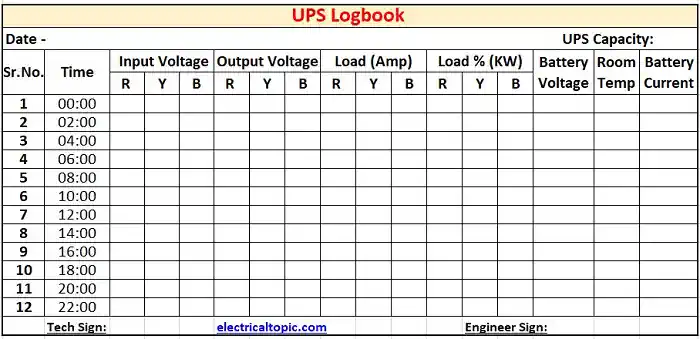
3- Types of logbook parameters. :
Different types parameters are noted down in logbooks in technical system as per requirement. which are listed below.
- Date and time.
- Incoming voltage.
- Outgoing voltage.
- Current in Amp
- Load percentage and apparent power in kVA
- Active output power in kW
- Battery voltage.
- Battery charging or discharge current
- Temp and humidity.
1- Date and Time:
Date and time is the most important in log book. If we want to know about exact parameters from last week then we can easily find out.
2-Incoming voltage.
Record the input AC voltages and frequency from the UPS display. On a unit with a separate bypass input, identify its readings separately when the display provides them.
3- Outgoing voltage.
Record the UPS output AC voltage and frequency. Note the active operating mode and whether the load is being fed by the inverter or the bypass source.
4- Current in Amp.
Record the displayed UPS output current in amperes. Where the UPS is three-phase, record each phase separately and compare the readings against the site’s loading and balance limits.
5- Load in percentage of capacity (KVA)
Record the load percentage shown on the UPS and any kVA or kW values displayed. Use the manufacturer’s stated rating and display definition when comparing the load with available capacity.
6- Active output power in kW
Use kW for instantaneous active power and kWh for energy accumulated over time, if the UPS provides an energy register. Compare both kW and kVA loading with the UPS nameplate limits when those values are available.
7- Battery voltage
Record the displayed DC battery string voltage, battery state and any alarm. Use the battery and UPS documentation for the expected voltage in the current charge state.
8- Battery charging or discharge current
Record battery current from the UPS display and identify it as charging or discharging. Compare trends at comparable operating states and flag alarms or unexpected changes.